MediaTek has had a really good year, if I may so. The Taiwanese semiconductor company’s current offering of mobile processors powers several devices announced this year. Its Dimensity series can also be said to have made a significant contribution in pushing 5G phones into the hands of a lot more people.
If you are wondering what new chipsets MediaTek has cooking in its oven, The Chinese leaker, Digital Chat Station, has revealed some few details of two new processors.
The two chipsets are the MT6893 and MT6891 and they will be 5nm and or 6nm processors according to him. The two chipsets will be high-performance processors as they feature the more powerful Cortex-A78 Arm CPU core.
The Dimensity 1000+ which is currently MediaTek’s most powerful mobile processor has Cortex-A77 cores. It is also a 7nm chip. These new chips should bring significant boosts in performance as they are built on a smaller node and feature a more powerful CPU. They should also launch under the Dimensity series and with built-in 5G modems.
There is no news yet regarding when the new processors will be announced but the leaker says that development is progressing faster than last year’s chips. We expect more details will be revealed in the weeks leading up to their announcements.
Looking to build a PC or upgrade your PC to match a shiny new RTX 3070 or RTX 3080 - or perhaps your planned purchase of an AMD RX 6800 or 6800 XT 'Big Navi' graphics card? Here's a complete Digital Foundry approved PC build.
The idea is to design a system that will give you a reasonable degree of future-proofing and the ability to handle both gaming and content creation tasks, all for a reasonable price.
For each category of components - processor, RAM, storage - we've given our top value-for-money recommendation, plus more options if you want to save money or go for higher-grade components than our suggested spec. At the end of the piece, you'll have a balanced build with components that should work together well.
AMD vs Intel: We've chosen an AMD Ryzen CPU and a matching motherboard for our 'default' build, thanks to Ryzen's generally lower cost of entry, higher core count and PCIe 4.0 support. These characteristics make it a good choice for mixed use, where your PC is used for gaming and streaming or content creation.
However, Intel's processors tend to offer slightly better raw gaming performance, especially at lower resolutions like 1080p. Therefore, we've included an equivalent Intel build towards the end of the article which keeps the majority of our components but swaps out the processor, motherboard and cooler.
Let's take a quick look at our recommendations summarised in handy table form, then we'll move onto the reasoning behind each component choice - plus alternative picks for saving money or getting faster components as your budget allows.
Click the links below to jump straight to the component recommendation you're interested in, or scroll on to see the whole build!
Note: Please disable ad-blockers to see our specific recommendations and live prices.
Recommended CPU: AMD Ryzen 5 3600
The Ryzen 5 3600 is the standout member of AMD's 3rd-gen desktop processor lineup, with more cores than corresponding Intel parts and a very reasonable price point. It's cheap enough that you could later upgrade to a faster 3rd-gen or 4th-gen Ryzen processor, but not so cheap that you'd feel obligated to do so right away! This CPU provides a good overall level of performance that should hold you in good stead for a few years, especially in modern games that can take advantage of CPUs like the 3600 with high core and thread counts. Ryzen processors are also a great choice for content creation workloads, like transcoding or editing video.
If you want to spend less: We'd recommend the 3300X, another insanely great value CPU. However, you will be slightly bottlenecking yourself, especially at low resolutions like 1080p, so we'd recommend the 3600 if at all possible. The 3300X is also incredibly hard to find at present, so the 3600 may be the best option.
If you can spend more: The 3600X comes with a better CPU cooler at a small premium. The 3700X and 3900X are more meaningful upgrades, providing more cores and faster single-core performance at justifiably higher price points.
Recommended CPU cooler: AMD Wraith Stealth / Wraith Prism
The Wraith Stealth and Wraith Prism coolers that come for free with AMD's 3rd-gen Ryzen CPUs are surprisingly decent, providing sufficient cooling performance albeit at relatively high noise levels. That means you don't need to spend any money on a custom cooler, as you would do with an Intel system.
If you want to spend more: If you want better thermal performance at lower noise levels, it can make sense to upgrade to a AiO ('All in One') liquid cooler. These generally provide better thermal performance than the Wraith at lower noise levels, while providing better access to the area of the motherboard near the CPU socket than a typical air cooler. However, you will need to dedicate more space in your case to mounting a radiator and fans. Most cases support 120mm, 140mm or 240mm radiators without much problem, but larger 280mm, 360mm and 380mm mounting positions are less commonly available - so always check what radiator mounts your case supports.
Another option is a better air cooler. These tend to heat up more quickly than an AiO but will provide about the same overall cooling performance and noise levels. They're easier to install, but take up more space near the CPU socket which can make swapping out RAM or plugging in some fan headers more difficult. Before buying, check your case's CPU height clearance.
Recommended motherboard: A budget B550 or X570 board
While B450 boards are an even cheaper option that will normally work out of the box with the Ryzen 5 3600, B550 and X570 motherboards have two major advantages: support for future AMD processors (ie Ryzen 4000-series) and support for PCIe Gen 4.0 storage and graphics cards. Having access to these adds a degree of future-proofing that you won't find on B450, in exchange for a slightly higher up-front cost. X570 boards tend to support a larger number of PCIe 4.0 devices simultaneously, but tend to cost more. If you plan to have a lot of fast PCIe 4.0 storage installed, then X570 makes sense; otherwise go for B550 as you'll get better value.
When choosing a motherboard, we recommend sticking to the lower end of the market unless you plan on heavy overclocking, using super-fast RAM or installing a large number of PCIe drives. Basically all of the mainstream manufacturers produce good stuff - Asus, Gigabyte, MSI - so don't worry too much about your choice if you can see it has the features you might want (Wi-Fi, enough NVMe drive slots, USB-C and so on). You can always check for reviews of your chosen drive as a sanity check before you buy!
If you want to spend less: Get a cheap B450 board, preferably a board with a 32MB BIOS that may support next-gen Ryzen CPUs like MSI's B450 Max series. You'll give up PCIe 4.0 support, but save a decent amount.
If you can spend more: Get a fancier board, but be reasonable - each dollar spent here could almost be certainly used elsewhere if you can bump your graphics card or processor up a tier!
As we discovered in our RAM testing on Ryzen article, 3200MHz CL16 RAM represents the best value option right now. If you can get higher frequencies (the MHz value) or lower latencies (the CL number) at a similar price then go for it, but 3200MHz CL16 is a great starting point. Don't worry about brand here - memory is largely a commodity, so you're mostly paying for a specific flash manufacturer (useful for overclocking) or the looks (nothing says bling like RGB RAM).
If you want to spend less: Slower RAM isn't any cheaper these days, so your only option here is to stick with 8GB of memory. If you think you'll be able to upgrade soon, get one 8GB stick and then get another exactly the same when you can to reach our original planned configuration. Otherwise, go for two 4GB sticks, as running only a single stick results in a noticeable performance penalty that's best avoided.
If you can spend more: You could opt for 32GB if you're doing content creation, or higher frequency sticks if gaming is more the focus. Anything up to 3600MHz CL16 should be a reasonable price; beyond this the performance gains get pretty small.
Recommended storage: Crucial P2 1TB NVMe SSD
This one's pretty simple: 1TB of storage space will give you enough room to keep Windows 10 and a good amount of (non-Warzone) games installed simultaneously, while the NVMe M.2 connection means that there are no cables to plug in and game load times are short - ideal for taking advantage of future cross-generation games that should benefit from fast read and write speeds. In terms of manufacturers, we like drives from Samsung, Adata, Crucial, WD and Sabrent. We have full SSD recommendations here if you're interested!
If you want to spend less: Swap that NVMe SSD for a SATA SSD. Boot and game load times will be marginally slower, but you'll be able to get the same capacity at a much lower price. Don't go for an HDD though - come on, it's 2020.
If you can spend more: There are lots of options here. The obvious one is to add a secondary SATA SSD or spinning disk hard drive for media/game storage, but you could also opt for a larger NVMe drive to allow more games to be installed at once. Finally, you could also upgrade to a faster PCIe 4.0 drive, which is useful in the here and now for content creation like 4K video editing - and may become better utilised by games over the next few years.
Recommended PSU: 750W Gold modular/semi-modular
A 750W power supply is recommended for RTX 3080 systems, so that's what we've gone for here. If you plan to use an RTX 3070 instead, feel free to swap in a 650W PSU instead. We like modular and semi-modular power supplies because they leave more space free in your case for building, but non-modular alternatives are fine too. Brand is important here; we recommend the likes of Corsair, Seasonic, EVGA and Be Quiet! Any mainstream brand should be fine, but you really want to avoid no-name units here as if your PSU goes, it may take every other component in your system with it. Additionally, look for at least a Gold rated power supply as this indicates a base level of efficiency.
If you want to spend less: you'd probably be able to get away with a 650W PSU here if you stick to the rest of our component recommendations, but you might have less headroom for future upgrades. Whatever you do, don't sacrifice on brand and get a no-name option - in our view, it's better to make cuts elsewhere in your build than take the risk.
If you can spend more: You can get a higher-spec power supply, but Nvidia still only recommend a 750W PSU even with a Core i9 10900K and an RTX 3090, so there's no massive need to push the boat out beyond 750W for a standard system, even if you plan to overclock. You could opt for a more premium brand, like Seasonic, or a higher efficiency rating instead.
Recommended case: Fractal Design Meshify C (or pick your own)
Cases are a very personal choice, as they're the part of your computer that you'll see the most often. Basically any ATX case on the market will suit this build as long as it can physically fit the graphics card you've chosen, so feel free to choose what appeals to you if the reviews for it are at least decent and GPU clearance figures sync up!
We like the Fractal Design Meshify C and the Lian-Li O11 Dynamic because they emphasise airflow; great if you've got a power-hungry GPU like the RTX 3080. However, you might prefer a quieter case like the Phanteks P400A or NZXT H510, so do a bit of research and pick the one you like best.
What about an Intel build?
Good question! In that case, swap out the Ryzen 5 3600 and B550/X570 motherboard for a Core i5 10600K, Core i7 10700K or Core i9 10900K. The Z490 platform provides all of the features you'd want, including memory overclocking and the potential for PCIe 4.0 support with a next-gen Intel processor, although it does cost a fair amount. You'll also need an air cooler or AiO - we recommend something by Noctua, a classic CM Hyper 212 Evo or an AiO from the likes of Alphacool, Corsair or NZXT.
While 4K performance isn't hugely different between similarly-priced Intel and AMD systems, your processor will make more of a difference at lower resolutions (1440p and 1080p) and higher frame-rates (144, 240 or even 360Hz). This is where Intel still holds onto a small advantage, so a pure gaming build designed to operate at 1080p or 1440p might be better served by choosing Intel parts.
What about Ryzen 5000 and Radeon RX 6000?
If AMD's claims hold water, then Ryzen 5000-series CPUs could be a big step forward in terms of gaming performance, especially when paired with a Radeon RX 6000 graphics card like the RX 6800, RX 6800 XT or RX 6900 XT. However, these processors will debut at or above their recommended retail price, while 3rd-gen Ryzen processors will hit historic lows, so you will be paying more for that extra performance. If you're not fussed about building a computer right now, then it makes sense to wait to see how good the new processors are.
Similarly, it's worth holding off on an RTX 30-series purchase (if you even have the option!) if you want to see how good AMD's recently announced RX 6000 series graphics cards are. They certainly have the potential to offer better value for money than Nvidia's offerings, although questions remain over their ray-tracing performance and AMD's lack of a real DLSS equivalent. In general, waiting is almost always the right move, so don't get caught up in the hype over a new product launch if you are still happy with your current system!
What should I spend the most money on?
Generally, the performance-affecting components that will cost the most in a balanced build are the graphics card, processor, motherboard and RAM. Of these, the graphics card and processor are where you should probably spend any extra money you have.
Going up a 'tier' to a new model (eg RTX 3070 to RTX 3080 or Ryzen 5 3600 to Ryzen 7 3700X) will normally provide the biggest benefit, compared to getting a more expensive version of the same model (eg choosing a premium Asus ROG Strix RTX 3080 instead of a cheaper Asus Tuf 3080, or a Ryzen 3600X over a Ryzen 3600).
How do I check my build?
You could always post it in the comments below or ask us on Twitter (@wsjudd) - we'll try to be around to answer any questions! Otherwise, there are some great sites out there like PC Part Picker and Logical Increments that provide good guidance on choosing complementary components. It's also wise to check out reviews of components like PC cases and motherboards, as there are a lot of options here and the best-looking parts aren't always the easiest to work with. Gamers Nexus and Hardware Unboxed are great publications for case and motherboard reviews in particular.
Total cost
So how much do our builds come to? Component prices change all the time and graphics cards in particular are in short supply, but we can have a go of summing up our components choices at the time of writing. Our primary build, focused around the Ryzen 5 3600, an X570 motherboard, 16GB of RAM and a 1TB NVMe SSD comes to around £675 for all components - plus whatever you spend on your graphics card; probably around £650 for the RTX 3080. That makes for a final sum of around £1325.
If we instead opt for the Intel-based system - with Core i5 10600K, Hyper 212 Evo cooler and Z490 motherboard, but otherwise the same parts - it comes to around £775, about £100 more expensive, plus the RTX 3080's cost of around £650. That brings the Intel system's total cost to around £1425.
Neither of these are insignificant chunks of change, but you'll be left with a powerful gaming PC that should cope easily with the latest games for at least a few years, whether you're gaming at 1080p, 1440p or even 4K.
Remember that this is for a complete desktop PC, but we haven't included an operating system (as Windows 10 can be bought online for relatively cheap these days and Linux works nicely for gaming) or peripherals (so you'll need to keep your existing monitor, keyboard,mouse and headset, or buy them fresh if you don't have any!).
Can I have a table of links?
Sure, here you go. Three recommendations for each category - default, cheaper and more expensive - with a few changes from the recommendations above, due to stock considerations and the need to recommend specific products here, where earlier we went for more general advice. Note that there are separate suggestions for CPU, cooler and motherboard depending on whether you prefer AMD (lower prices, PCIe 4.0 support) or Intel (faster gaming performance, higher cost of entry). Feel free to mix and match according to your preferences between the default, budget and upgrade recommendations too!
We've only had a chance to do this for our UK (🇬🇧) picks so far, so apologies to any Americans in the audience - do let us know if you want to see an American equivalent of this table!
Choosing just the right build will always depend on your own circumstances, preferences and market conditions, so don't be afraid to take our recommendations with a grain of salt and forge your own path. There isn't a 100 per cent perfect build for every person at every time, but hopefully these picks will give you at least a good starting point. Of course, this is far from a definitive guide, so feel free to post your own component recommendations in the comments that would make this build even better. We'll keep things updated going forward, so check back if you're not quite ready to pull the trigger yet - we'll be waiting for you.
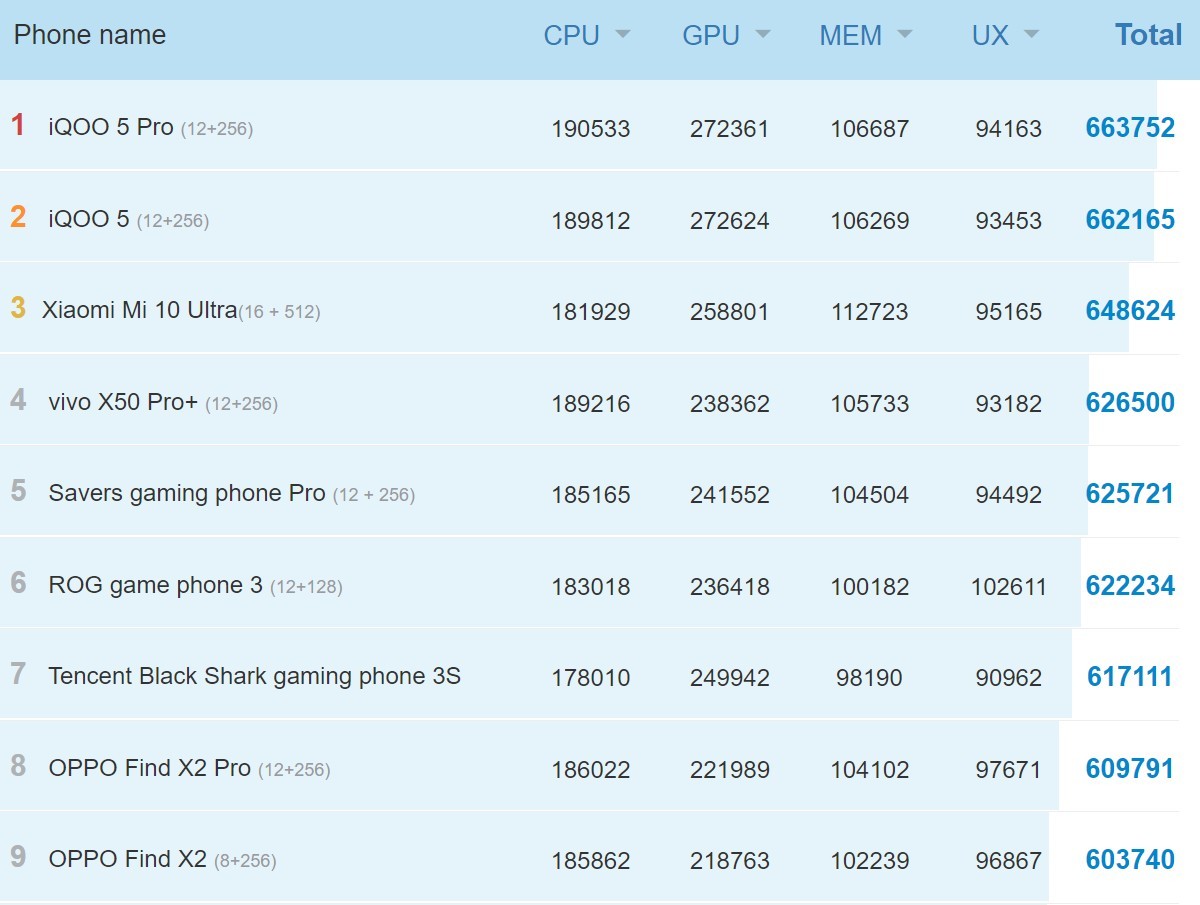
The Snapdragon 875 chipset is code-named “Lahaina” and it may be significantly faster than expected – an early benchmark shows a score of over 847,000 points in AnTuTu. This is much higher than its predecessor, which currently tops the charts with 663,000 points or so.
That’s a jump of over 25%, a huge leap for a yearly upgrade. Of course, these results will need to be corroborated before the Qualcomm team can pop the champagne.
For comparison, the iPhone 12 scored 660,000. While the Kirin 9000 and Exynos 1080 posted scores of 696,000 and 693,000, respectively – enough to top current Snapdragon 865 phones, but nowhere near the alleged result of the 875.
Interestingly, AnTuTu’s charts are currently led by Snapdragon 865 (the vanilla chip, not the plus). The AnTuTu team explains (link in Chinese) that RAM and storage configurations also play a role in the final score, so high capacity UFS 3.1 storage might offset the minor clock speed deficit of the non-plus chipset.
Another post mentions that Oppo has been testing an overclocked version of the 865, which will go up to 3.2 GHz or so. The prime core in the 865+ is clocked at 3.09 GHz.
Qualcomm will officially unveil the Snapdragon 875 (and, potentially, other chips as well), and if this benchmark result is to be believed, the event will be a must-see.
Although the Qualcomm Snapdragon 875 isn't due for release until the first week of December, several leaks have given us a rough idea about its performance. However, most of the leaks have Geekbench results. The chip has evaded AnTuTu so far, until now.
Renowned leaker Abhishek Yadav on Twitter stumbled upon what appears to be an AnTuTu score for a Qualcomm chip called Lahania. This, according to an earlier report, is none other than the Qualcomm Snapdragon 875. The silicon manages to net a score of 874,868, handily outperforming its predecessor- the Snapdragon 865+, which only manages to score around 629,245. Unfortunately, a breakdown of the scores wasn't provided. It also leaves Samsung's Exynos 1080 and the HiSilicon Kirin 9000 in the dust. However, both chips were only a few points shy of 700,000 on AnTuTu.
While the stellar 800,000+ AnTuTu score might suggest that the Snapdragon 875 is on par with Apple's A14 Bionic, that isn't necessarily the case. AnTuTu is designed to compare devices based on the same operating system, as emphasized by its makers. It'll be interesting to see how the Exynos 2100 fares on AnTuTu. The chip, much like the Snapdragon 875, has surfaced exclusively on Geekbench so far. Based on what we've seen so far, the Snapdragon 875 is slightly behind the Exynos 2100
Two 'early' reviews of the soon to be released AMD Ryzen 7 5800X and Ryzen 5 5600X CPUs show impressive performance gains using the Zen 3 architecture over its predecessor, Zen 2, according to SiSoftware.
The benchmarking software developer posted performance evaluations of the two Ryzen 5000 series CPUs online this week, showing a roughly 15 percent to 40 percent improvement over the previous generation Ryzen 5 3600X for the Ryzen 5 5600X and a roughly 25 to 40 percent improvement for the Ryzen 7 5800X over the Ryzen 7 3700X.
It's speculative at the moment, as Videocardz notes, since it's unclear whether SiSoftware was in possession of review units of the CPUs itself, or whether it was aggregating data from others who were benchmarking the CPUs using its software.
In a critical claim by the benchmark maker, the six-core Ryzen 5 5600X was apparently able to beat out the eight-core Intel Core i9-9900k, which would be a major win for Team Red if true.
SiSoftware also described the performance of the Ryzen 7 5800X as being equivalent to a 12-core Zen 2 processor, like the Ryzen 9 3900X. "We certainly did not expect performance to be this good," the developer said.
We haven't tested the new AMD CPUs ourselves, so it remains to be seen if these numbers hold up, but if they do, Team Red will have come through big in its battle with archrival Intel.
Markets are down, but not collapsing. Investors remain worried about the coronavirus, and Tuesday’s election remains up in the air. Uncertainty rules the day, exacerbated by recent market losses. Wall Street, however, expects that the bulls will start running again after next week’s results – who wins will be less important than having a result.In the meantime, market declines and low share prices make for a prime time to buy in – if you judge the bottom correctly. Do that, and the rest is just ‘buy low and sell high.’ And to that end, Wall Street’s analysts have been pointing out stocks that may have hit bottom.Using TipRanks database, we pinpointed three such stocks. Each is down significantly, but each also has a Strong Buy consensus rating and at least 30% upside potential for the coming months.Fury Gold Mines (FURY)Gold – just the precious metal asset – has grown popular during the course of 2020. The coronavirus crisis and investors’ desire for a stable store of value pushed it above $2,000 earlier this year, and one ounce of gold is still selling for over $1,800. For those who haven’t got that kind of resource, however, buying stock in gold miners may be the next best thing.Fury Gold Mines is a small-cap mining company headquartered in Toronto and focused on exploiting the vast resources of the Canadian North. With mines in British Columbia, northern Quebec, and the far-north territory of Nunavut, Fury has large gold reserves in both open pit and underground mines. World gold production dropped by 1% in the last 12 months, giving the first hint that we may be at ‘peak gold,’ and prices will soon increase further.That development would bode well for Fury, which operates at a net loss. The company formed earlier this year, as a restructure of Auryn Resources that involved a merger with Eastmain and the divestment of Peruvian mines. The result is a company that is focused on Canadian development, able to take advantage of Canada’s stable work environment.The stock saw sharp declines recently, when the new FURY ticker started trading, taking Auryn’s place in the market and keeping the older company’s trading history. The drop saw Fury shares shed 67% this month.Covering the stock for Cantor, analyst Matthew O’Keefe sees plenty of upside ahead. The analyst noted, "Based on a combined gold equivalent resource of 3.9Moz, Fury is trading $43/oz versus peers at $60/oz. We expect that, as the new management makes its mark with new drill results (towards the end of 2020 and throughout 2021) and demonstrates advancement of its projects, the stock should move up."But how much up? O’Keefe’s $2.60 price target on FURY suggests a 126% upside potential for the coming year and supports his Buy rating. (To watch O’Keefe’s track record, click here)The Wall Street analyst consensus on Fury is a Strong Buy, based on 4 Buy ratings with no Sells or Holds. The stock is selling for $1.13 and its $3.37 average price target suggests it has room to nearly double in the next 12 months. (See FURY stock analysis on TipRanks)Star Bulk Carries (SBLK)Next up, Star Bulk Carries, is a Greece-based shipping company specializing in the dry bulk ocean carry trade, the backbone of the world’s shipping industry. Star Bulk operates a fleet of 116 carriers, ranging in size from ~50,000 tons to giant Newcastlemax bulk haulers rated over 200,000 tons. The trade disruptions caused by corona were hard on the industry, and SBLK was no exception. The stock is down 47% year-to-date. However, the company’s financial performance this year has been in line with its historical pattern – the first half of a calendar year sees a net loss, while the second half sees net gains. The losses in 1H20 where normal for SBLK’s pattern – and the outlook for Q3 is a return to net profits, with EPS projected at 30 cents.Covering this stock for Deutsche Bank, analyst Amit Mehrotra notes a series of related points: “[We] think the company’s net debt position should improve by about $50M vs. 2Q levels, reflecting cash flow generation in excess of >$40M of debt paydown in 3Q. We also expect the company’s prospective breakeven to reduce to under $11k per day… While we remain frustrated by the lackluster performance of SBLK shares in the context of above-mentioned improving fundamentals...we remain very comfortable that the intrinsic value of SBLK’s equity value is improving in the current environment…” Mehrotra sums up his view of Star Bulk succinctly: “On the whole, we’re encouraged by the fundamental trajectory of the company…” The analyst rates SBLK a Buy, while his $15 price target implies an upside potential of 143% from current levels. (To watch Mehrotra’s track record, click here)With 3 recent Buy reviews, SBLK holds a unanimous Strong Buy rating from the analyst consensus. The stock is currently trading at $6.18 and has an average price target of $12.09, making the one-year upside 96%. (See SBLK stock analysis on TipRanks)Heritage-Crystal Clean (HCCI)Pollution is a problem, no matter what. We all want a clean environment to live in, and we should all care about how modern industrial pollutants are disposed of. Heritage-Crystal Clean inhabits that clean-up niche, providing environmental cleaning services, including vacuum services for street cleaning, light industrial and mechanical parts cleaning technology, and a variety of waste recovery services including recovery and disposal of oil and oil products, antifreezes, and general industrial liquid waste. It’s an important, often overlooked, and vital niche in a modern technological society.After a dip into negative territory in Q2, HCCI reported stronger results for Q3. Revenues gained sequentially from $74 million to $82 million, and EPS swung from a 31-cent loss to an 18-cent gain. Despite the positive results, both earnings and revenues remain depressed compared to the year-ago quarter, and the stock has failed to regain traction after last March’s decline. HCCI is down 49% year-to-date.Roth Capital’s Gerry Sweeney, in his comments on this stock, notes that “Revenue continues to rebound as economic activity improves from COVID shelter in place orders... The highlight in the quarter was a faster than anticipated rebound in margins. While margins are still down from last year’s pre-pandemic level of 25.7%, they are up from 2Q margins of (28.2%). The improvement was driven by higher labor utilization and leverage of assets, lower solvent costs, and the internalization of waste disposal…”Sweeney rates the stock a Buy. His $21 price target indicates confidence in a solid 32% upside for the next year. (To watch Sweeney’s track record, click here.)Over the past three months, three other analysts have thrown the hat in with a view on HCCI. The three additional Buy ratings provide the stock with a Strong Buy consensus rating. With an average price target of $20.75, investors stand to take home a 30% gain, should the target be met over the next 12 months. (See HCCI stock analysis at TipRanks)To find good ideas for beaten-down stocks trading at attractive valuations, visit TipRanks’ Best Stocks to Buy, a newly launched tool that unites all of TipRanks’ equity insights.Disclaimer: The opinions expressed in this article are solely those of the featured analysts. The content is intended to be used for informational purposes only. It is very important to do your own analysis before making any investment.
Security researchers have managed to extract the secret key used by Intel CPUs to encrypt updates and the effects of their discovery could be wide reaching.
With the key in hand, it's now possible to decrypt the microcode updates Intel releases to patch security vulnerabilities and other bugs. This could potentially even allow hackers to release chip updates with their own microcode though they wouldn't be able to survive a system reboot.
Independent researcher Maxim Goryachy along with researchers Dmitry Sklyarov and Mark Ermolov from Positive Technologies made the discovery by leveraging a critical vulnerability Ermolov and Goryachy found in the Intel Management Engine back in 2017.
Goryachy provided further insight on the research team's latest discovery in a direct message to Ars Technica, saying:
“At the moment, it is quite difficult to assess the security impact. But in any case, this is the first time in the history of Intel processors when you can execute your microcode inside and analyze the updates.”
Chip Red Pill
Three years ago Goryachy and Ermolov discovered a critical vulnerability in the Intel Management Engine, indexed as Intel SA-00086, that allowed them to execute any code they wanted inside the dependent core of Intel's CPUs. While the chip giant released a patch fixing the bug, it could still be exploited as CPUs can be rolled back to an earlier firmware version without the fix.
Earlier this year, the research team was able to use the vulnerability they found to unlock a service mode embedded in Intel chips called “Red Unlock” which is used by its engineers to debug microcode. Goryachy, Ermolov and Sklyarov then named their tool for accessing the debugger Chip Red Pill in a reference to The Matrix.
By accessing one of Intel's Goldmont-based CPUs in Red Unlock mode, the researchers were able to extract a special ROM area called MSROM (microcode sequencer ROM). They then reverse engineered the chip maker's microcode and following months of analysis, were able to extract the RC4 key used by Intel in the update process. However, the researchers were not able to discover the signing key used by Intel to cryptographically prove whether an update is authentic or not.
In a statement, Intel officials downplayed the team's discovery while reassuring users that their CPUs are safe from potentially malicious chip updates, saying:
“The issue described does not represent security exposure to customers, and we do not rely on obfuscation of information behind red unlock as a security measure. In addition to the INTEL-SA-00086 mitigation, OEMs following Intel’s manufacturing guidance have mitigated the OEM specific unlock capabilities required for this research. The private key used to authenticate microcode does not reside in the silicon, and an attacker cannot load an unauthenticated patch on a remote system.”
Goryachy, Ermolov and Sklyarov's discovery may not be able to be used by hackers but for security researchers it could be a real help as they'll now be able to analyze Intel's microcode patches to see how the company fixes bugs and security vulnerabilities.